Scientific software
Corning is best known for Gorilla Glass. I led a team of designers building digital tools that help its scientists discover new materials faster.
Software that extends what scientists know
Corning invents materials, including the glass Apple asked for on the first iPhone. My team built software for the people doing that research. The goal was tools that work well, put scientists at the center, and add to their skills and knowledge rather than getting in the way.

One architecture for many tools
A new platform was taking shape, with several application modules being built at once. I designed a shared UX architecture so they would feel like one product: the objects in the system, how they behave, and the framework every module sits in.


It starts with space. Regions define the main stage where information appears and work happens. Panels are lightweight containers that can stand alone or attach to a selected object and show what's relevant to it. On top of that I defined the mechanics of each region and panel, and an interaction model that made the whole thing predictable. For example, people can add objects to the stage and move them in either direction, depending on what the module needs.
Tools for making tools
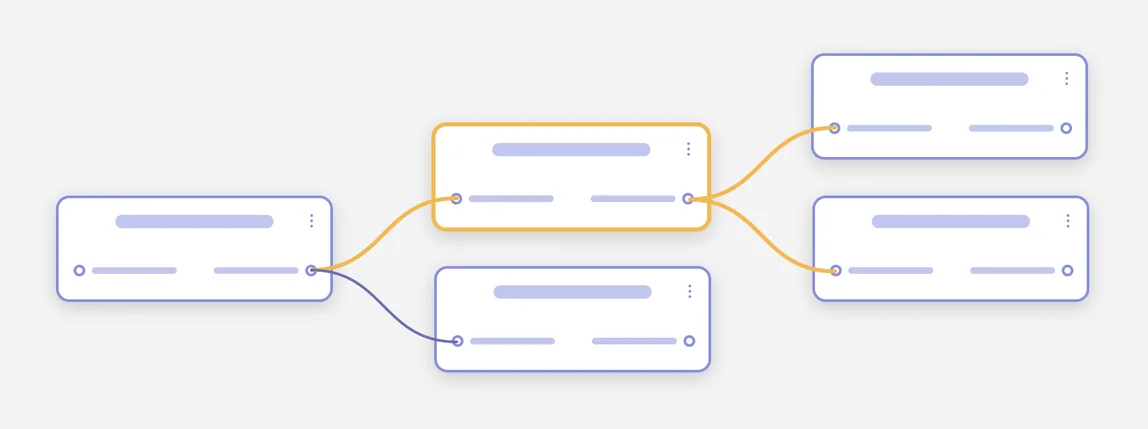
The most ambitious goal was letting scientists build their own tools and workflows. That meant every component had to be modular and flexible. We chose a node‑based interface because it gives the most freedom to assemble workflows and processes.
The anatomy of a node
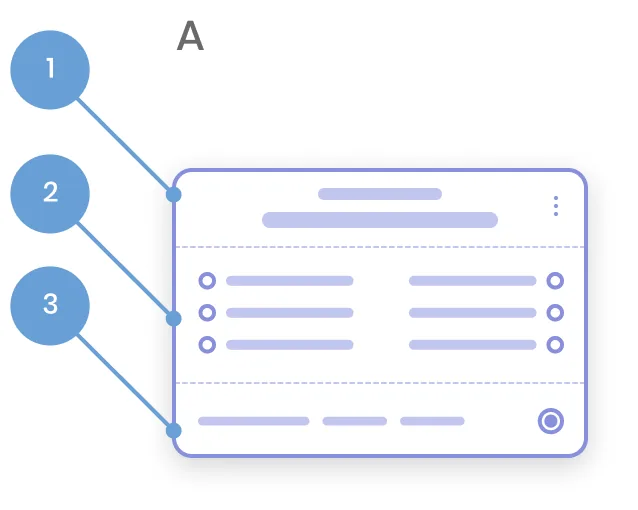
Nodes carry the whole experience, so I broke them down part by part and specified exactly how the parts work together. The title names the action and its sub‑action. Clicking the body selects the node and opens its parameters, dragging moves it around the stage, and the status region opens a drawer with that node's status.
The parameters panel is where people set the values for a node, so it had to hold anything from a single field to a complex mix of controls. Tim Stegner executed the design of the parameters panel.